Cinema 4D Toolkit
Plugin • Cinema 4D
An ever-growing collection of handy tools to speed up your Cinema 4D workflow.
Windows installer 19 MB · Mac plugin files 295 KB
TOOLKIT
What's Inside The Toolkit
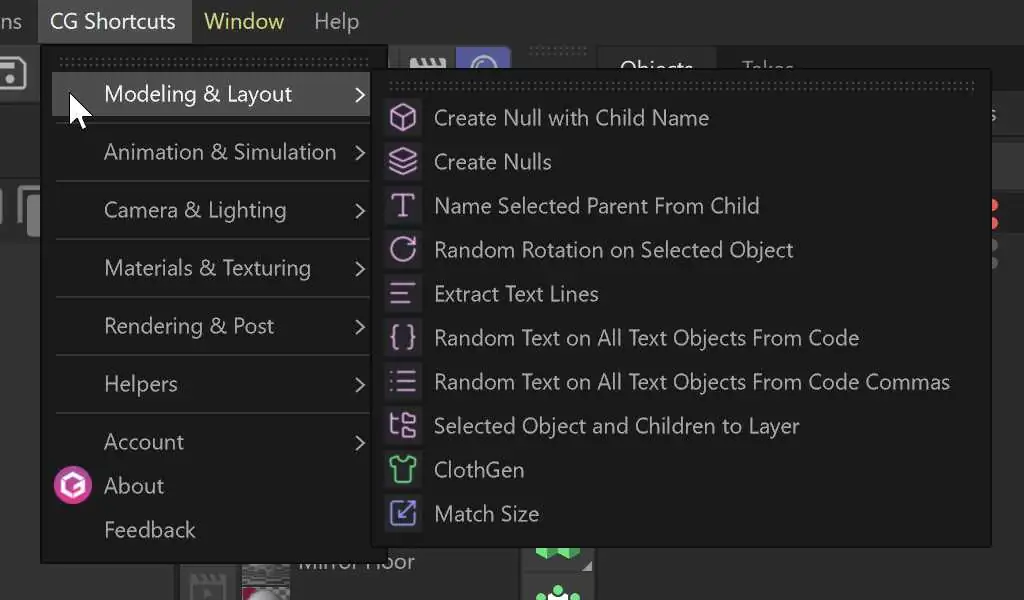
Every command lives under the CG Shortcuts menu in Cinema 4D — modeling helpers, animation utilities, camera & lighting, material shortcuts, and scene tools. More are added over time.
Finally an easy way to toggle C4D scene dynamics on and off - the most asked for feature of all time! Map it to your shortcuts keys for faster dynamics workflow.
Adds a null parent to your selection and names it from the child object.
Watch videoQuickly parents selected objects under new nulls in one step.
Renames parent objects using the name of the selected child.
Applies random rotation to selected objects — great for variation passes.
Watch videoSplits multi-line MoText into separate text objects, one per line.
Fills all text objects from a list you configure inside the script.
Same as above, using a comma-separated string for quick swaps.
Moves a parent selection and its entire hierarchy onto a new layer.
Adds a ClothGen generator to your scene for fast cloth setups - low res proxy, thickness, bevel and UVs built in.
Watch videoAdds a KeyGen keyboard generator — randomised keycaps on a 0.25U layout grid with constant-size symbol UVs, key and plate materials, and optional animated re-flow.
More infoAdds a Match Size tag to selected objects — match scale and/or position to a reference or target size.
Set the pivot (axis) of selected editable mesh objects. Align to a vertex, edge, or polygon, drop a polygon flat on the floor with Set Base, or place the axis anywhere in the object's bounds with live X/Y/Z sliders.
Adds a Pin to Object tag — pin an object's transform to a point, edge, or polygon on another mesh.
Adds shapeable barn doors or a snoot to a Redshift (or native) area light, so you can cut the beam and control spill.
Auto-detects animation on selected objects and bakes it to keyframes — PSR, PLA, and MoGraph clones.
Shifts keyframes on selected animated objects — handy for offsets and loops.
Drag and drop texture maps or browse files and folders to build Redshift PBR materials.
Assigns a unique random-colored material to each selected object.
Watch videoSets random viewport display colors on a multi-selection.
Watch videoRandomizes diffuse color on every material in the scene.
Watch videoRandomizes colors only on materials you pick in the Material Manager.
Watch videoAssigns your selected materials randomly across selected objects.
Watch videoConverts Redshift materials to Cinema 4D Standard materials.
Adds a Quick Visibility tag so an object shows only during the frame ranges you type (e.g. 1-45, 60-90), with independent viewport and render control.
Preview and apply a one-step scene cleanup: organize cameras, lights, objects and environment, remove what cannot render, and add editor notes.
Sign In From Cinema 4D
After installing, open CG Shortcuts → Account → Sign In in Cinema 4D and use your cgshortcuts.com credentials. Your licence syncs automatically while your membership is active.
Need help with install, activation, or a specific tool? Contact Dave via chat for support.
Membership & licence
- Included with active Monthly, Yearly, or Lifetime membership
- Use on up to 2 registered computers at a time
- Remove a device from your account to free a seat
- Full terms in our Membership Apps Terms of Use